Per board
For one-off designs
€29per finished board
- Gerbers, BOM, pick-and-place and the KiCad project for every board that passes
- Up to 16 runs per design; a failed board and its runs are free
- Pack of 10 boards: €249, shareable with your team

RP2040 minimal, Raspberry Pi’s reference board: their placement, routed by Koppar and checked by KiCad.
AI PCB design · now open
Koppar is an AI PCB designer: it turns a plain-English description into a KiCad schematic, a routed PCB and a live-priced bill of materials. Gerbers ship only at zero DRC errors.
Each board below came out of the studio from the sentence printed under it: schematic, placement, routing, then KiCad DRC. Nobody touched the copper. Open one in the studio to see every step and take it apart.
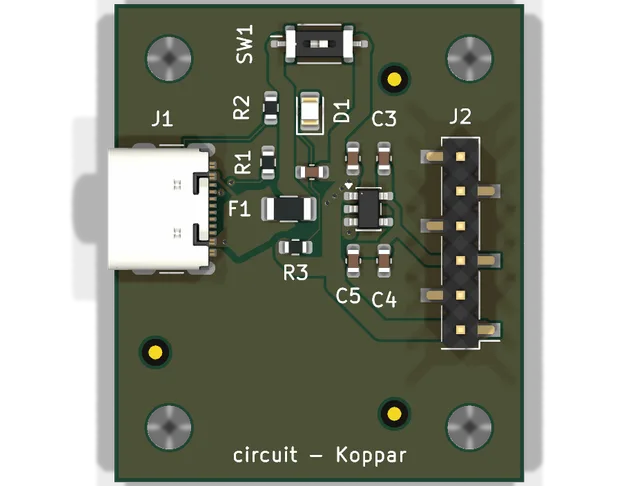
“Power my breadboard from a USB-C phone charger: 5 V and 3.3 V, an on/off switch and a little light so I know it's on”
2 layers · 21 parts · 38 connections · 30 × 35 mm · 0 DRC errors
Open in the studio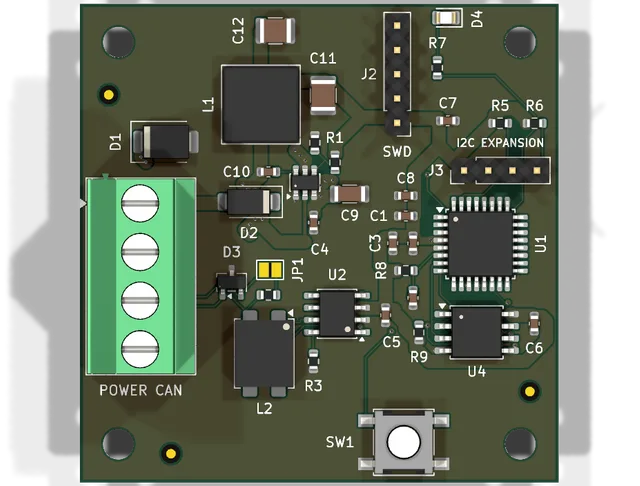
“12 V CAN-bus sensor node: STM32G0, CAN transceiver, 3.3 V buck and a screw terminal”
2 layers · 44 parts · 87 connections · 50 × 50 mm · 0 DRC errors
Open in the studio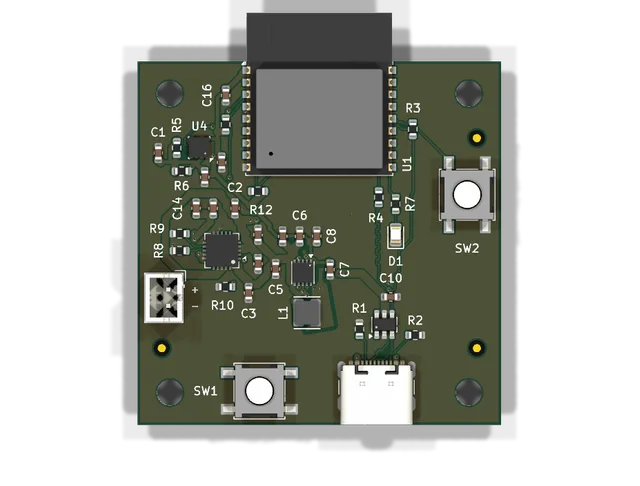
“USB-C powered ESP32-C3 board with a LiPo charger, a BME280 sensor on I²C and a status LED; USB-C and battery connector on the board edge”
2 layers · 46 parts · 131 connections · 45 × 45 mm · 0 DRC errors
Open in the studioMost AI design tools stop at a drawing. Koppar carries the design through placement, routing and verification, and only calls it done when a fab would agree.
One download. The files a fab and an assembler accept, plus the KiCad sources if you want to change anything first.
gerbers.zipGerber layers and Excellon drill files. Released only when the board passes every check.bom.csvEvery part matched to a Mouser or LCSC listing, with its stock, the price at your quantity and the total. Out-of-stock lines are flagged, with alternates.circuit.drc.jsonThe KiCad design-rule report. Zero means zero; anything else is listed.circuit.kicad_pcbThe board itself: footprints placed, tracks routed, ground and power zones filled. Editable.circuit.kicad_schThe schematic, with real library symbols and a sheet per function on larger designs.circuit-ipc2581.xmlIPC-2581 and ODB++ for CAM handoff, next to the Gerbers.A clean board goes straight to a manufacturer, with a bill of materials priced from real stock.
No CAD experience, no component libraries to learn. Describe what you need and review what comes back.
"A Raspberry Pi HAT with PoE, CAN bus and status LEDs." Plain English in. The studio asks the follow-up questions a design engineer would.
Schematic with real parts, electrical-rules check, placement, routing, KiCad DRC, connectivity. You review the board in 3D and refine it in chat.
Download the Gerbers and the priced BOM and send them to your fab and assembler. Or open the KiCad project first and make it yours.
Claude Code, any MCP client, the CLI or plain HTTP can run the whole pipeline. Your model does the thinking; Koppar does the lookups, the gates, place and route, DRC, BOM and fab files.
Read the agent docsclaude mcp add --transport http koppar https://app.koppar.ai/mcp --header "Authorization: Bearer sc_…"Your first three designs are free, no card needed. After that you pay per finished board or by subscription. A board that fails KiCad’s check is never charged, and neither are the runs that led to it.
For one-off designs
€29per finished board
For freelancers and independent engineers
€99/ month
For hardware startups
€249/ month
For design bureaus and companies
€149per seat / month, from 5 seats
A finished board is one design that passes KiCad’s DRC with every connection routed. A run is one generation or re-generation by Koppar; edits you make by hand don’t count. Runs are counted because each one calls a model and a router. Bring your own model API key and runs are unlimited on every plan.
Prices in euros, excl. VAT. Monthly plans, cancel any time.
Paid plans open in 2027. Until then every account gets three free designs. Everyone who used Koppar before paid plans open gets the founding price, 30 % off the first year: Builder €69, Studio €174, Team €104 per seat.
The language model stops at the netlist. Placement, routing, pours and DRC are engine code, measured by KiCad on professionally routed open-hardware boards. The board you get passed KiCad DRC with every net connected, or it is shown as failed.
Yes. You download a KiCad 10 project: .kicad_sch, .kicad_pcb, .kicad_pro, with stock library symbols and footprints. Open it in KiCad and change anything.
Yes, from a single copper layer up to eight. Koppar picks the layer count from the design, or uses the one you ask for, and a board that cannot be routed completely is tried again with more layers, 4 then 6, while the run has time for it.
No. Parts are resolved against the KiCad libraries, a verified pinout database and live distributor stock. An unresolved part blocks the schematic and is named in the report.
Yes. Koppar exposes the pipeline over MCP, a CLI and REST. Your agent’s model does the design reasoning; the server runs the lookups, gates, place and route, DRC, BOM and fab export.
Your first three designs are free, no card needed. After that: €29 per finished board ($29 outside Europe), Builder at €99 ($99) a month, Studio at €249 ($249) a month, or Team at €149 ($149) per seat a month. A board that fails KiCad’s check is never charged, and neither are the runs that led to it. Paid plans open in 2027; until then you can add your own model API key in Settings and keep going.
Write what the board has to do. Sign in, and the description is waiting in the workspace, one click from a schematic, a routed board and a bill of materials.
Designing boards for a team or a company? Book a 30-minute call