Loading the board
Connections
0 / 150
DRC errors
…
Layers
2
Size
52 × 51 mm

RP2040 minimal, Raspberry Pi’s reference board: their placement, routed by Koppar and checked by KiCad.

Drag to orbit.

AI PCB design · now open

Describe the circuit.
Get the board.

Koppar is an AI PCB designer: it turns a plain-English description into a KiCad schematic, a routed PCB and a live-priced bill of materials. Gerbers ship only at zero DRC errors.

Sign in with Google or your email. Your first three designs are free.

Sentences in, boards out

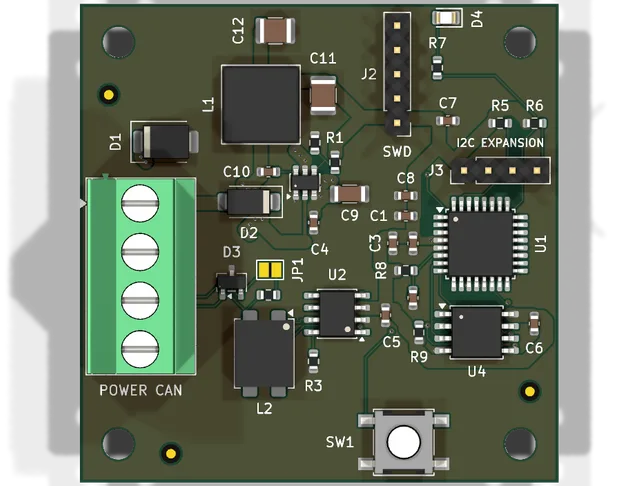
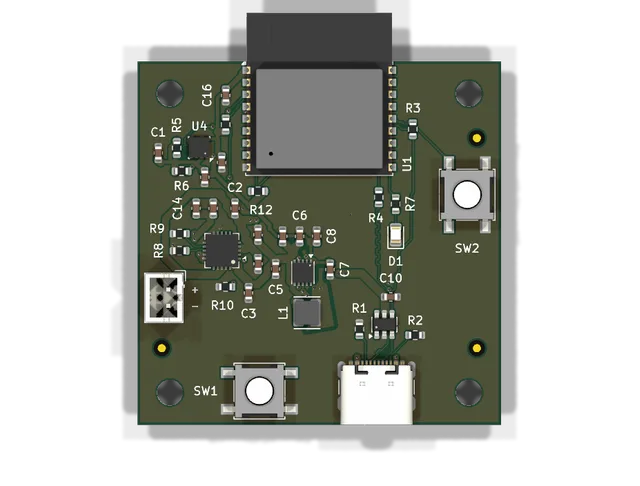
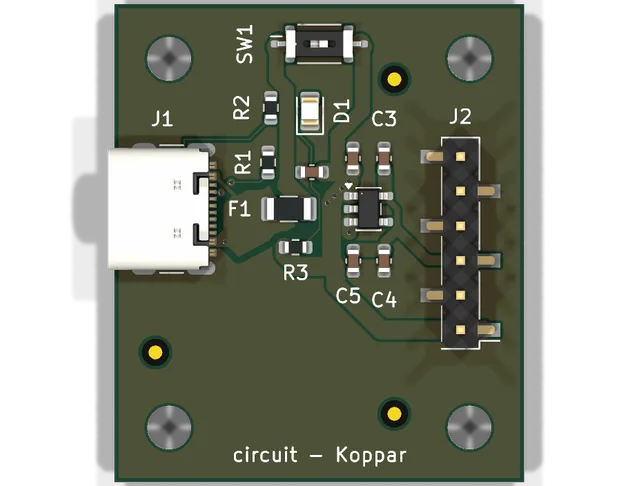
Each board below came out of the studio from the sentence printed under it: schematic, placement, routing, then KiCad DRC. Nobody touched the copper. Open one in the studio to see every step and take it apart.

The whole job, not a head start

Most AI design tools stop at a drawing. Koppar carries the design through placement, routing and verification, and only calls it done when a fab would agree.

Real parts, looked up
Symbols and footprints come from the KiCad libraries and a pinout database, and every line is checked against distributor stock. A part that cannot be found is reported, not invented.
Placed and routed, not sketched
Placement and routing take the netlist to finished copper: every net routed, ground and power poured, 2 or 4 layers, checked by KiCad.
Verified before you see it
Electrical rules on the schematic, KiCad DRC on the board, connectivity on every net, courtyards and fab minimums. Whatever is left, the report names it.
Gerbers only when the board earns them
Fab files are released at zero DRC errors and every connection routed. A mostly-routed board never reaches a fab as "done".
A bill of materials with live prices
Each line is matched to a Mouser or LCSC part, priced at your quantity, with its stock shown and alternates when it runs out. You know what a batch costs before you order it.
Still standard KiCad
Everything is a genuine .kicad_sch and .kicad_pcb with real library symbols and footprints. Open it, inspect it, change it. Nothing is locked in.

What you can order with

One download. The files a fab and an assembler accept, plus the KiCad sources if you want to change anything first.

  • gerbers.zipGerber layers and Excellon drill files. Released only when the board passes every check.
  • bom.csvEvery part matched to a Mouser or LCSC listing, with its stock, the price at your quantity and the total. Out-of-stock lines are flagged, with alternates.
  • circuit.drc.jsonThe KiCad design-rule report. Zero means zero; anything else is listed.
  • circuit.kicad_pcbThe board itself: footprints placed, tracks routed, ground and power zones filled. Editable.
  • circuit.kicad_schThe schematic, with real library symbols and a sheet per function on larger designs.
  • circuit-ipc2581.xmlIPC-2581 and ODB++ for CAM handoff, next to the Gerbers.

From board to your door

A clean board goes straight to a manufacturer, with a bill of materials priced from real stock.

AISLER
One click: the board files and the part placement land in your AISLER project. No AISLER account needed.
PCBWay
A live board quote in the studio, so the total includes the boards. Order and pay on PCBWay with the files.
JLCPCB
Assembly files with LCSC part numbers already in the BOM, ready to upload to JLCPCB. Basic-library parts are preferred to avoid setup fees.
Any fab
Gerbers, IPC-2581, ODB++, pick and place and an assembly BOM: the files every fab and assembler reads.
How ordering works

From a sentence to a fab order

No CAD experience, no component libraries to learn. Describe what you need and review what comes back.

  1. Describe the project

    "A Raspberry Pi HAT with PoE, CAN bus and status LEDs." Plain English in. The studio asks the follow-up questions a design engineer would.

  2. The engine designs and checks it

    Schematic with real parts, electrical-rules check, placement, routing, KiCad DRC, connectivity. You review the board in 3D and refine it in chat.

  3. Order it

    Download the Gerbers and the priced BOM and send them to your fab and assembler. Or open the KiCad project first and make it yours.

Or drive it from your own agent

Claude Code, any MCP client, the CLI or plain HTTP can run the whole pipeline. Your model does the thinking; Koppar does the lookups, the gates, place and route, DRC, BOM and fab files.

Read the agent docs
claude mcp add --transport http koppar https://app.koppar.ai/mcp --header "Authorization: Bearer sc_…"

Pay for boards that pass

Your first three designs are free, with no card. After that you pay for finished boards. A board that fails KiCad's check costs nothing.

Pay as you go

For makers and one-off boards

€15per finished board

  • Gerbers, BOM and the KiCad project for every board that passes
  • A board that fails the check is not charged
  • Buy boards ahead and share them across a team
  • Use your own model API key if you prefer
Start free

Team

For design bureaus and companies

Per seatset with you

  • Seats for the whole team, one shared balance
  • Designs are not counted
  • Your part libraries and design rules
  • Invoicing and IP terms
Talk to us

Paid plans open in 2027. Until then every account gets three free designs, and teams on a pilot get boards and seats from us: write to hello@koppar.ai. Prices in euros, before VAT.

Questions engineers ask first

Can an AI really design a PCB from a text description?

The language model stops at the netlist. Placement, routing, pours and DRC are engine code, measured by KiCad on professionally routed open-hardware boards. The board you get passed KiCad DRC with every net connected, or it is shown as failed.

Is the output real KiCad?

Yes. You download a KiCad 10 project: .kicad_sch, .kicad_pcb, .kicad_pro, with stock library symbols and footprints. Open it in KiCad and change anything.

Does it route 4-layer boards?

Yes. The plan picks 2 or 4 layers from the design, and a 2-layer board that cannot close is retried on 4.

Does it make up parts?

No. Parts are resolved against the KiCad libraries, a verified pinout database and live distributor stock. An unresolved part blocks the schematic and is named in the report.

Can I use it from Claude Code or my own agent?

Yes. Koppar exposes the pipeline over MCP, a CLI and REST. Your agent’s model does the design reasoning; the server runs the lookups, gates, place and route, DRC, BOM and fab export.

What does it cost?

Your first three designs are free, with no card. After that: €15 per finished board ($15 outside Europe), Builder at €39 ($39) a month with five boards included, or Team, priced per seat. A board that fails KiCad's check is never charged. Paid plans open in 2027; until then you can add your own model API key in Settings and keep going.

Start with a sentence

Write what the board has to do. Sign in, and the description is waiting in the workspace, one click from a schematic, a routed board and a bill of materials.

Try

Sign in with Google or your email. Your first three designs are free.